Why is my business not showing up on Google Maps?

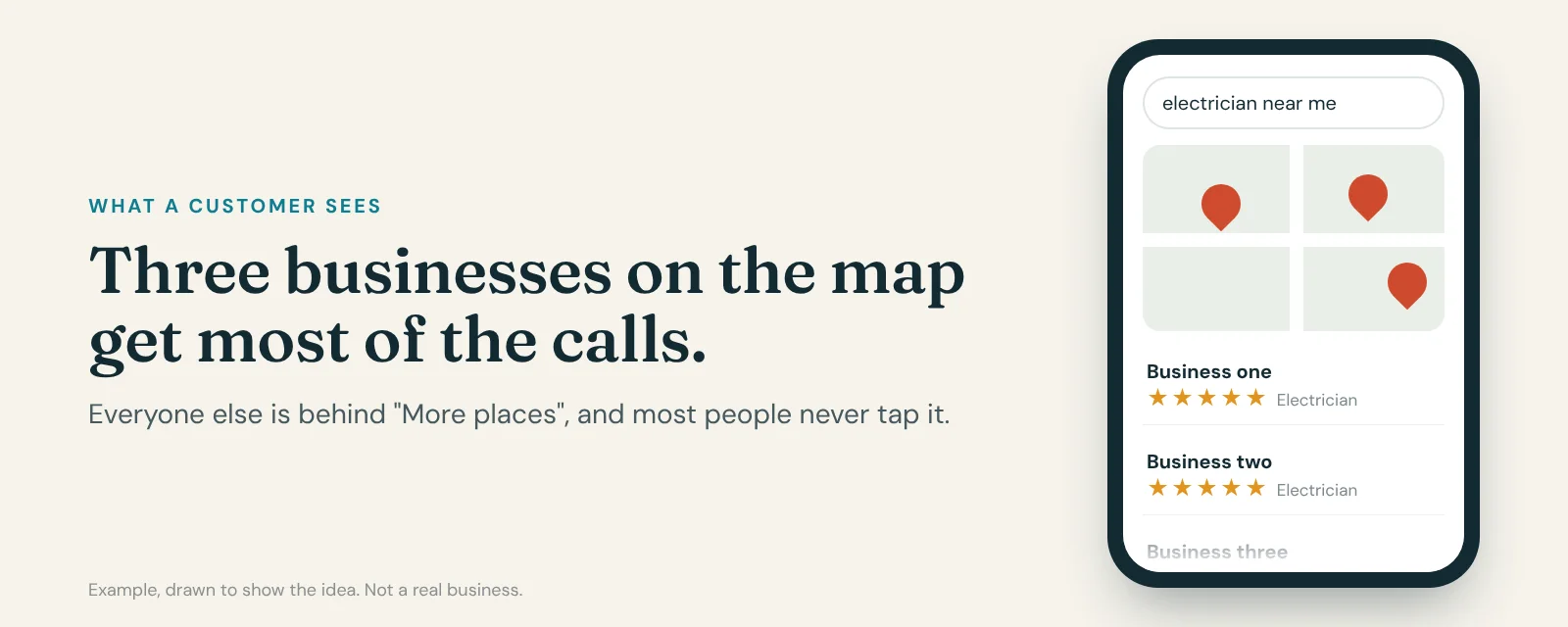
A phone searching electrician near me. The map shows three pins and three businesses, with More places below. Most calls go to those three.

The short answer

  • Google shows a different map to every person, depending on where they are standing when they search.
  • So you can show up at your own front door and vanish two suburbs away.
  • The map runs on your Google listing, how close you are, and your reviews. Not your website, and not your ads.
  • Fix your listing first: hours, every service in your customers' words, real photos and the right category.
  • Check from a grid of points across your area, not just from your desk.

Part 1 of 3: Three reasons a service business goes missing on Google

See where you stand first

Get your Free 3R check
Read the transcript

Your business shows up on Google Maps when you search from your own desk. Two suburbs away, it is gone.

That is not a glitch. Google shows a different map to every person, depending on where they are standing when they search.

First, what we are talking about. When someone searches "electrician near me", Google shows a map with three businesses under it. That box is called the map pack. Those three get most of the calls. Everyone else is a tap away on "more places", and most people never tap.

Think about how people used to find a plumber. They opened the Yellow Pages, looked at the first big ad, maybe the second, and rang it. Nobody worked down to the little one at the bottom. The map pack is the same thing with a different cover. The difference is, the Yellow Pages showed the whole town the same page. Google prints a different page for every street.

So when someone tells you "you rank number two", that is not an answer. Number two where? From which street?

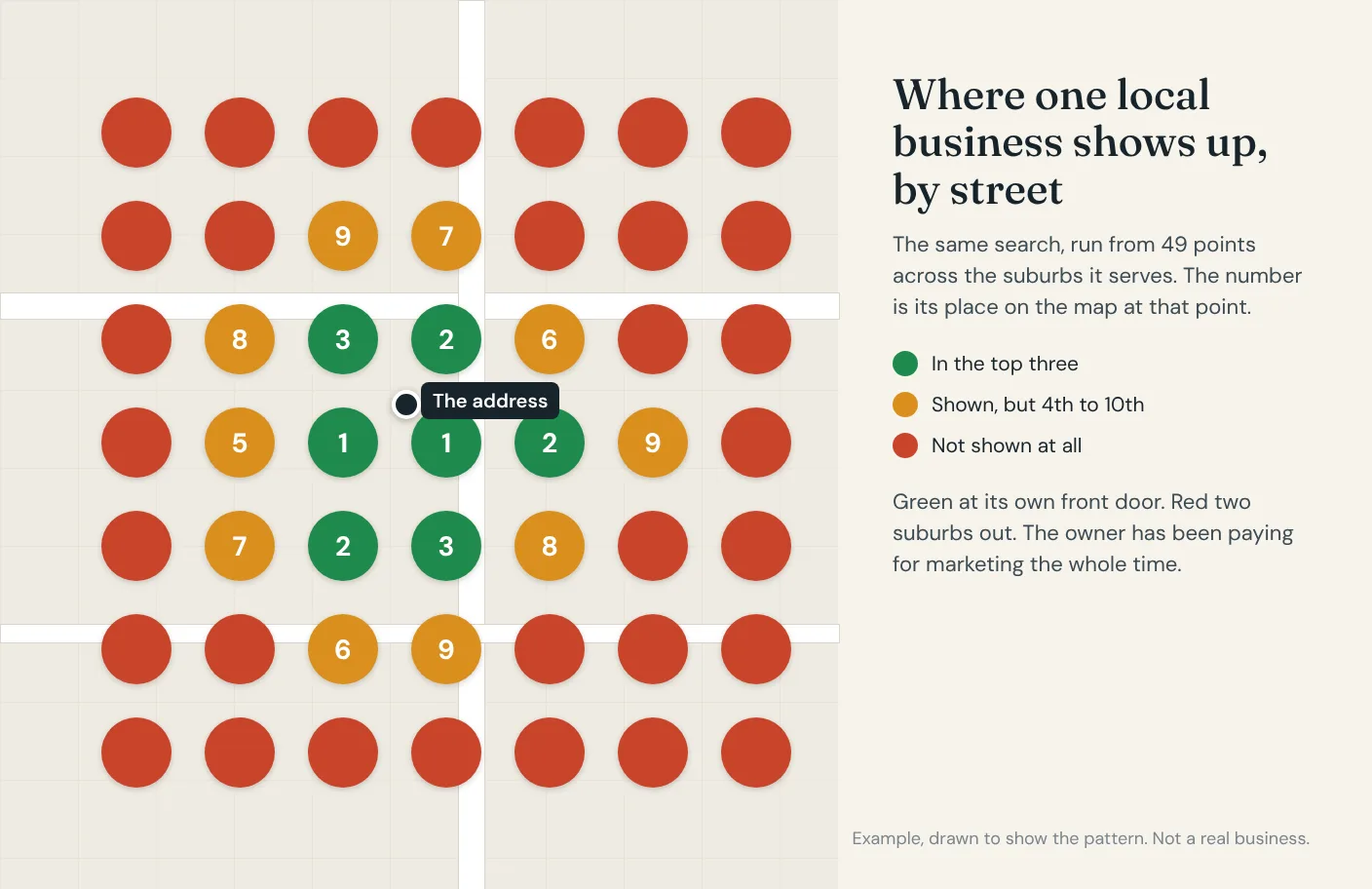
The only way to see the truth is a grid of points across the area you actually serve. Say forty-nine points, seven across and seven down, across your suburbs. Run the same search from every point. Green where you are in the top three. Amber where you are shown but fourth to tenth. Red where you are nowhere. Most owners who do this find a small green patch around their own address and red everywhere else. And they have been paying for marketing the whole time.

Here is something that surprises people. A business with a real street address on its listing tends to hold up far better across an area than one that hides it. If you work from home and hide your address, that is allowed. Just know it is not free. You are trading it for reach, so everything else has to work harder.

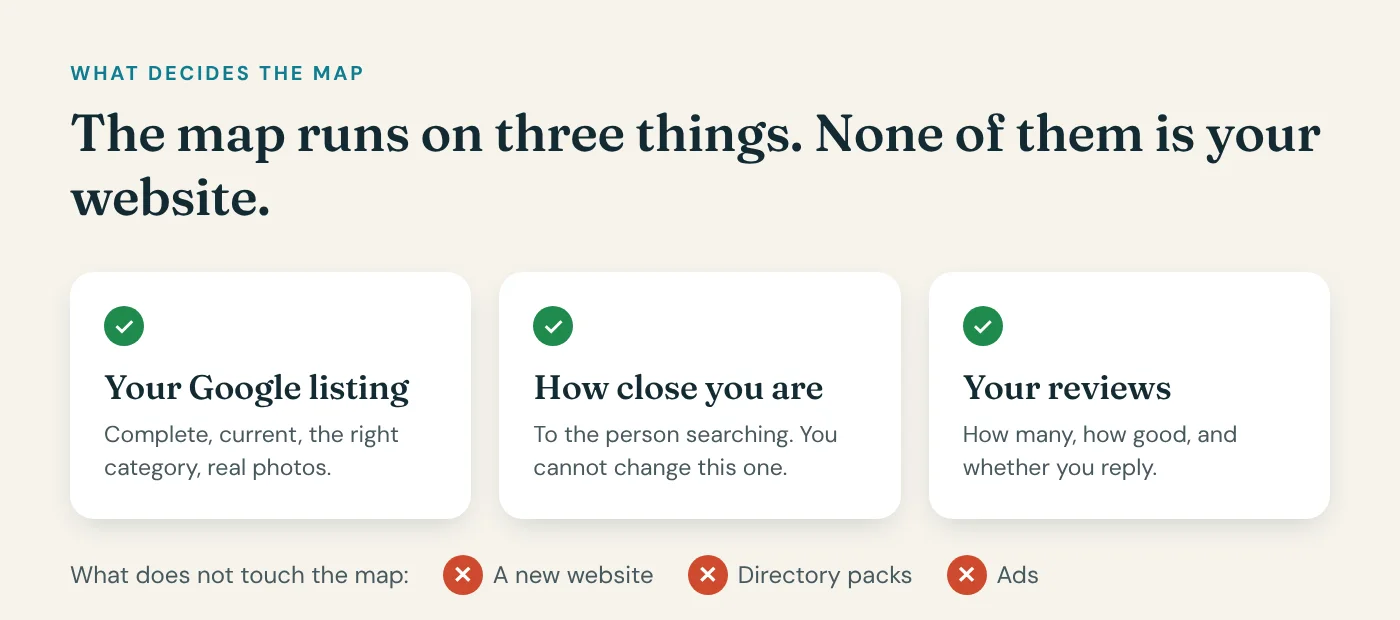
What most people try first is a new website, or a pack of directory listings, or ads. None of that touches the map. The map runs on three things: your Google listing, how close you are to the person searching, and your reviews.

So before you spend a dollar anywhere else, go through your listing. Your hours, including public holidays. Every service you do, in your customers' words, not the words on your licence. Photos from this year, of your real work. The right main category. Post something, because a listing nobody has touched in two years looks closed. And get your reviews moving, because they feed the map as well as the phone.

Then run the grid again in a month and watch the green spread.

Reason one. You show up at your own front door and vanish two suburbs out, and the fix is your listing, not your website.

It is more affordable than most people think. See where you stand first. The Free 3R check is at officestaff.ai.

Because your Google ranking is not one number, it is a different result for every place a customer is standing.

You can sit in the top three at your own front door and vanish two suburbs away. Most owners have never seen this, because the only place they ever check is their own desk.

Why do only three businesses get the calls?

Think about how people used to find a plumber. They opened the Yellow Pages, looked at the first big ad, maybe the second, and rang it. Almost nobody worked their way down to the little one at the bottom of the page.

Google Maps is the same thing with a different cover. When somebody searches, Google shows three businesses on the map. Most people ring one of those three and never scroll. They only look further if all three have bad reviews.

The difference is that the Yellow Pages showed everyone in town the same page. Google shows a different page to every person, depending on where their phone is.

Why does my ranking change from street to street?

Search for what you do while standing in your own carpark and you will probably look great. Google knows where you are, you are nearby, and there you are.

Walk two suburbs over and search the same thing. The three businesses on the map may be completely different, and yours may not be there at all.

This is why the single number some agencies report to you is close to meaningless. "You rank number two" is not an answer to anything unless it comes with where. The only way to see the truth is to check a grid of points spread across the area you actually serve, and look at what Google shows at each one.

When you do that you get a map, not a score. Green where you are in the top three, red where you are nowhere. Most owners find a small green patch around their address and red everywhere else, and they have been paying for marketing the whole time.

A grid of 49 check points across one local business service area. Green in the top three near its address, amber a little further out, red everywhere else.
The same search run from 49 points across the suburbs one local business serves. An example drawn to show the pattern, not a real business.

Does hiding my address cost me?

I keep running into this, and it surprises people.

A business with a real street address on its Google profile tends to hold up far better across an area than a business without one. I have looked at listings where a business with an address and very few reviews was still beating a business with a much stronger review profile that had no address showing.

That matters enormously if you are a mobile or service area business, because Google lets you hide your address, and plenty of operators do. It is worth knowing that the hidden address is not free. You are trading it for reach.

That is not a reason to publish your home address if you work out of your house. It is a reason to know what it is costing you, and to work harder on everything else if you decide to keep it hidden.

Why won't a new website or ads fix it?

Most owners, when they realise they have a problem, go and add some keywords to their website. Or they buy a package of directory listings. Or they pay for ads, which works exactly as long as you keep paying.

None of that touches the thing that decides the map result. The map is mostly about your Google profile itself, how complete and current it is, how close you are, and your reviews.

So the usual first move is to spend money on the website while the profile sits there with the wrong hours, three photos from 2019 and a category that does not match what the business actually does.

The map runs on three things: your Google listing, how close you are, and your reviews. A new website, directory packs and ads do not touch it.

What should I fix first?

Look at your profile before you spend a dollar anywhere else. Hours, including public holidays. Every service you offer, written the way customers say it. Photos from this year. The right primary category.

Post something. An open profile that has not been touched in two years looks closed.

Get your reviews moving, because review count and score feed into the map result as well as into whether someone rings you.

And see your actual map before you accept anyone's report. If a provider cannot show you where you turn up across your service area, they are not working on the thing that makes your phone ring.

What happens after a customer finds me?

Getting found is only the start. The moment a customer sees you on that map, they do the next thing automatically, which is compare you to the other two.

That is where reviews decide it. How many Google reviews does a business need?

The other two reasons

This is part 1 of 3 in Three reasons a service business goes missing on Google. Part of our guide to Reach.

All three reasons in one video

Read the transcript

Your business shows up on Google Maps when you search from your own desk. Two suburbs away, it is gone.

That is not a glitch, and it is not bad luck. It is one of three reasons a service business goes missing on Google, and every one of them is on your own Google listing, not your website and not your ads.

One, you show up at your own front door and vanish two suburbs out. Two, your listing does not say what you do the way customers say it. Three, it was set up once, years ago, and nobody has been back.

Fix those three and you are in the race. Here is the first one.

Your business shows up on Google Maps when you search from your own desk. Two suburbs away, it is gone.

That is not a glitch. Google shows a different map to every person, depending on where they are standing when they search.

First, what we are talking about. When someone searches "electrician near me", Google shows a map with three businesses under it. That box is called the map pack. Those three get most of the calls. Everyone else is a tap away on "more places", and most people never tap.

Think about how people used to find a plumber. They opened the Yellow Pages, looked at the first big ad, maybe the second, and rang it. Nobody worked down to the little one at the bottom. The map pack is the same thing with a different cover. The difference is, the Yellow Pages showed the whole town the same page. Google prints a different page for every street.

So when someone tells you "you rank number two", that is not an answer. Number two where? From which street?

The only way to see the truth is a grid of points across the area you actually serve. Say forty-nine points, seven across and seven down, across your suburbs. Run the same search from every point. Green where you are in the top three. Amber where you are shown but fourth to tenth. Red where you are nowhere. Most owners who do this find a small green patch around their own address and red everywhere else. And they have been paying for marketing the whole time.

Here is something that surprises people. A business with a real street address on its listing tends to hold up far better across an area than one that hides it. If you work from home and hide your address, that is allowed. Just know it is not free. You are trading it for reach, so everything else has to work harder.

What most people try first is a new website, or a pack of directory listings, or ads. None of that touches the map. The map runs on three things: your Google listing, how close you are to the person searching, and your reviews.

So before you spend a dollar anywhere else, go through your listing. Your hours, including public holidays. Every service you do, in your customers' words, not the words on your licence. Photos from this year, of your real work. The right main category. Post something, because a listing nobody has touched in two years looks closed. And get your reviews moving, because they feed the map as well as the phone.

Then run the grid again in a month and watch the green spread.

Reason one. You show up at your own front door and vanish two suburbs out, and the fix is your listing, not your website.

It is more affordable than most people think. See where you stand first. The Free 3R check is at officestaff.ai.

That is the first reason, and it is the one you can see once you know to look. The second one is worse, because you cannot see it at all. Your listing is there. It just does not say what you do.

Someone types "electrician" and the name of your suburb. You are an electrician in that suburb. And you are not there.

Google is plain about how it decides. It says it looks at three things. How well your listing matches what they typed. How far you are from the person searching. And how well known you are.

You cannot move. So forget distance. Work on the other two.

Matching what they typed. Pick the most specific category for your main service. Not "contractor". "Electrician". List every service you do, in the words your customers use. Set your service areas to the suburbs you really cover. And write a plain description: what you do and where. Google's own words are that if your information is not accurate, your listing might not show up for relevant searches in your area.

Being well known. Google says more reviews and positive ratings can help your local ranking. So every customer gets asked. Every review gets a reply. That is it. There is no trick.

Now the myths. Three things people pay for that Google says do not work.

Myth one: you can pay Google for a better spot on the map. You cannot. Google says so. Ads are a separate thing and they are labelled.

Myth two: put your suburbs in your business name. "Best Plumber In Town" is not your name, and Google says adding words to your name is not allowed. It can get your listing suspended.

Myth three: buy some reviews to get going. It is against the law here, and Google removes them. Real reviews from real customers are the only kind that last.

I spent years working on my sales process. I thought the problem was the pitch. The real problem was nobody was finding me in the first place. Get found first. Search is where people are looking for you. Facebook is you interrupting them.

So check where you actually show up before you spend money on a new website, ads, or an agency.

Reason two. Your listing has to say what you do, the way customers say it, and nothing you can buy beats that.

It is more affordable than most people think. See where you stand first. The Free 3R check is at officestaff.ai.

So that is reason two. Which brings us to the third one, and it is the most common of the lot. The listing was set up once, years ago, and nobody has been back since.

Most Google listings were set up in an afternoon, years ago, and never touched again. Here is how to set yours up properly, in the order Google cares about.

Your name. Use the name on your van and your invoices. Google says your name should reflect your real-world name, and adding extra words is not permitted. "Best Plumber In Town" is not your name. Tick.

Your category. Google says use as few as possible and make them as specific as possible. "Pest control service", not "contractor". Add others only if they are a real part of the business. Tick.

Your address, or your service area. If customers come to you, show the address. If you go to them, Google says hide it and set a service area. Up to twenty suburbs or postcodes, and Google says keep it to about two hours' drive from your base. Tick.

Your hours, including holidays. Google says confirm your hours for public holidays even if they are the same. Closing for a week or more over Christmas? Mark it temporarily closed, not special hours. Tick.

Verified. If it is not verified, do that first. Google says verifying makes you more likely to show up at all. Tick.

Photos and services. Real photos of your team, your vans, your work. Not stock. Every service you do, in your customers' words. A short plain description. Tick.

Reviews. Ask every customer, reply to every review. Google says it helps your ranking, and the replies show the next customer someone is home. Tick.

Then put a reminder in your phone. The first of every month, check the listing. Hours change. Phone numbers change. Services change. Tick.

Reason three. Set up once and never touched. Eight ticks, one afternoon, and a reminder once a month.

It is more affordable than most people think. See where you stand first. The Free 3R check is at officestaff.ai.

Three reasons. You vanish two suburbs out. Your listing does not say what you do. Nobody has touched it in years.

Every one of them is on your Google listing, not your website, and not your ads. Which means every one of them is fixable this week, for nothing, by you.

Or by us. Local Authority is your listing rebuilt and kept current, your hours right, posts and photos every month, your details fixed across Apple Maps and Bing, and your map checked every month so you can see where you show up. Not software. Work that gets done. For about the cost of a coffee a day.

It is more affordable than most people think. See where you stand first. The Free 3R check is at officestaff.ai.

Subscribe, so the next one finds you.

Frequently asked questions

Why does my business show up for me but not for my customers?
Because Google gives a different answer depending on where the person searching is standing. Checking from your own desk shows you the best possible version of your ranking.
Does a Google Business Profile cost anything?
No. The profile is free. What costs money is somebody keeping it current.
Should you hide your address if you work from home?
You can, and Google allows it for service area businesses. Just know it tends to reduce how far you reach, so everything else has to work harder.
How often should you post?
Often enough that the profile never looks abandoned. One that has not been touched in two years reads as closed.

Sources

Google's own guidance on improving local ranking lists relevance, distance and prominence as the three factors, and names review count and score as part of prominence. The observation about listings with a visible address is from profiles we have looked at, not a published study.

Your listing and your customers stay yours.

Everything stays yours.

Your Google listing, your website and your customer list are yours, always.

Questions about billing?

Ask us before you start.

Free 3R check